
- 111
- 0
- 0
An anti-detect browser that meets all media buyers’ needs: what you need to know about working with Vision Browser
Depending on their approach, media buyers may opt out of certain services. Some don’t need a PWA; others don’t use proxies. However, there’s at least one service without which managing many accounts is simply impossible—an anti-detect browser.
And in this case, a single poor choice could result in all your accounts getting banned before any campaign even begins. That’s exactly why it’s crucial to choose a service you can truly trust. And today, we’re reviewing just such an option. What is Vision Browser, what are its advantages over competitors, and why is it the top choice for both beginners and experienced account managers—read all about it in our new review.
How to choose an anti-detection browser for your work
Before you start using any anti-detection tool, you need to check a few key points. Namely:
- Quality of digital fingerprints
The main thing to look for is how realistically the browser mimics digital fingerprints, since platform anti-fraud systems use these to identify bots and multi-accounts. Weak or “template-like” fingerprints are the number one cause of bans.
- Support for different browser engines
The more engines a service supports, the more broadly you can scale across different GEOs and platforms, where certain engines appear more natural.
- Compatibility with proxies and protocols
It’s important for an anti-detection tool to work reliably with various types of proxies and support modern protocols—this affects connection speed and the stability of accounts across different regions.
- Speed and stability
Anti-detect is a tool used daily, so delays or service outages directly impact profits. It’s worth checking if there are public uptime statistics available.
- Teamwork and access control
If you’re not working alone but with a team of buyers, it’s important that the browser allows you to flexibly divide profiles and access rights without the risk of accounts “overlapping.”
- Additional tools for scaling
Advanced features (behavior emulation, autofill, action synchronization, video substitution) save time and reduce the risk of detection when managing many accounts.
- Ease of transition from another service
If you’re already using another anti-detection tool, the ease of migrating profiles and settings is an important—though often underestimated—criterion.
- API and extensibility
For those scaling their operations, the ability to automate via API and integrate custom extensions is crucial.
What Is Vision Browser, and how does It stand out from the competition?
Vision is a Chromium-based anti-detection browser. It addresses all the points listed above. And its main advantage over competitors is the “smart fingerprint” feature. This feature selects a fingerprint that most closely matches your device, helping you easily bypass complex anti-fraud systems that analyze large volumes of data. All fingerprints are sourced from a proprietary database of real fingerprints collected from other devices, with no artificial generation involved.
In addition, the service supports full UDP over SOCKS5, which is also a rare feature among anti-detection tools. Thanks to this, Vision offers greater reliability and faster task execution.
What needs does Vision Browser meet for media buyers?
Thanks to its wide range of features, Vision Browser meets virtually all the needs of media buyers. And because the service’s interface is simple and user-friendly, it’s comfortable to use for both experienced buyers and beginners. Other advantages of the product include:
- Real browser fingerprints for maximum authenticity.
- The ability to create profiles for Chrome, Safari, and smartphones.
- Proxy support with full compatibility with UDP + QUIC protocols.
- 99.9% uptime with the ability to view the service status in real time at status.browser.vision.
- A unique proxy encryption feature that allows you to bypass ISP blocks and run even those proxies that would never work in any other anti-detection browser;
- Advanced features: Human Type, Vision Autofill, Synchronizer, video stream substitution, and note editing in already running profiles.
But it’s important to understand that Vision Browser isn’t just for media buyers—it’s also ideal for:
- Crypto projects
- Bettors (especially those who engage in arbitrage betting)
- Bonus hunters
- E-commerce
- Marketers, SMM specialists, and freelancers
- Anyone else who needs to manage multiple accounts
Overview of the interface and how to use Vision Browser
Getting started is quite simple. Go to the official website and download the browser. Next, complete the quick registration process to gain access to the service. By the way, Vision Browser offers a completely free 4-day trial period, which you can activate after registration by linking your Telegram account.
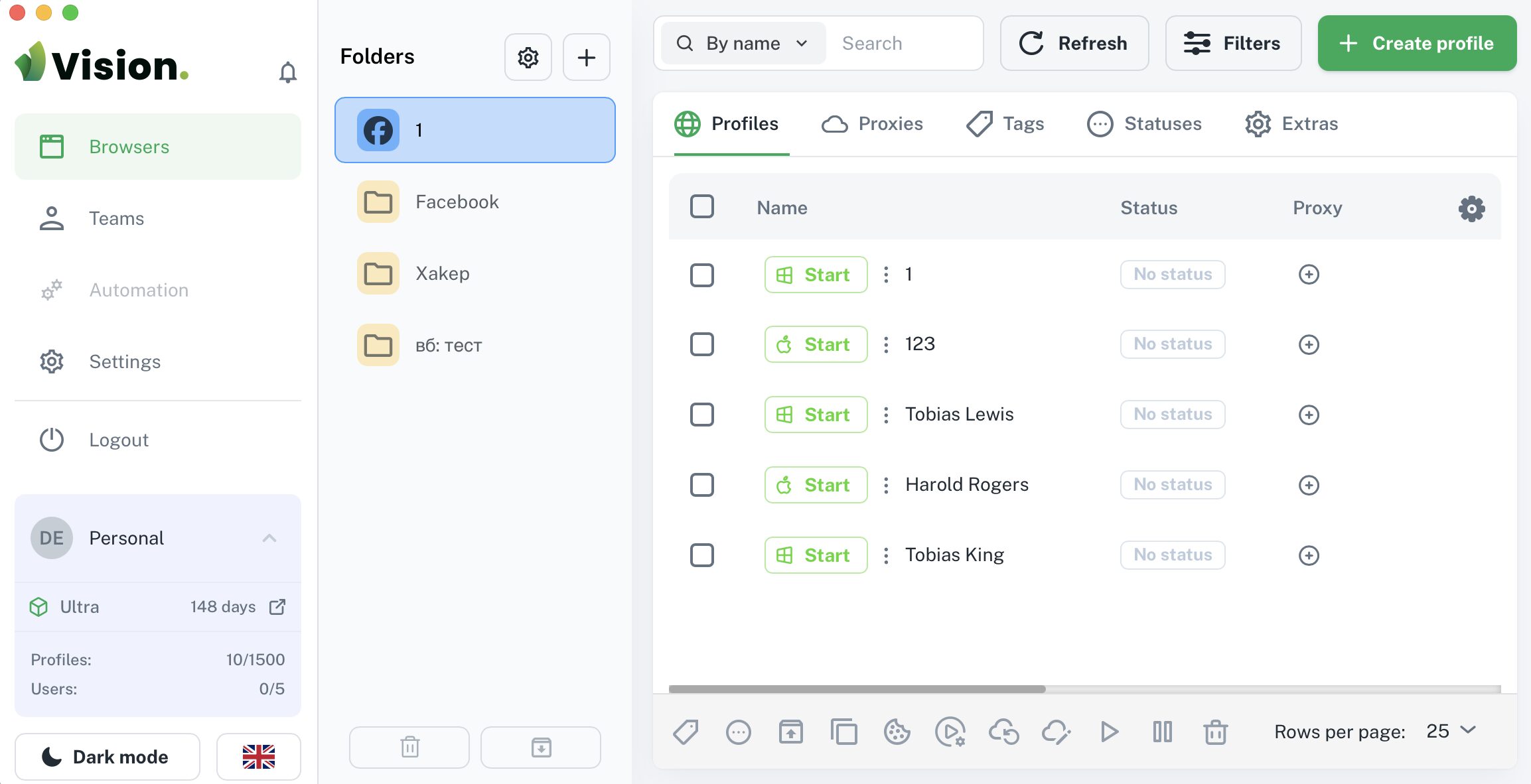
The interface here is truly extremely simple and intuitive. If you’ve ever used an anti-detection browser, you’ll quickly figure out what to do. You can create a profile right on the home page by clicking the corresponding button. If you have many profiles, you can import them directly into the browser, which significantly speeds up the process.
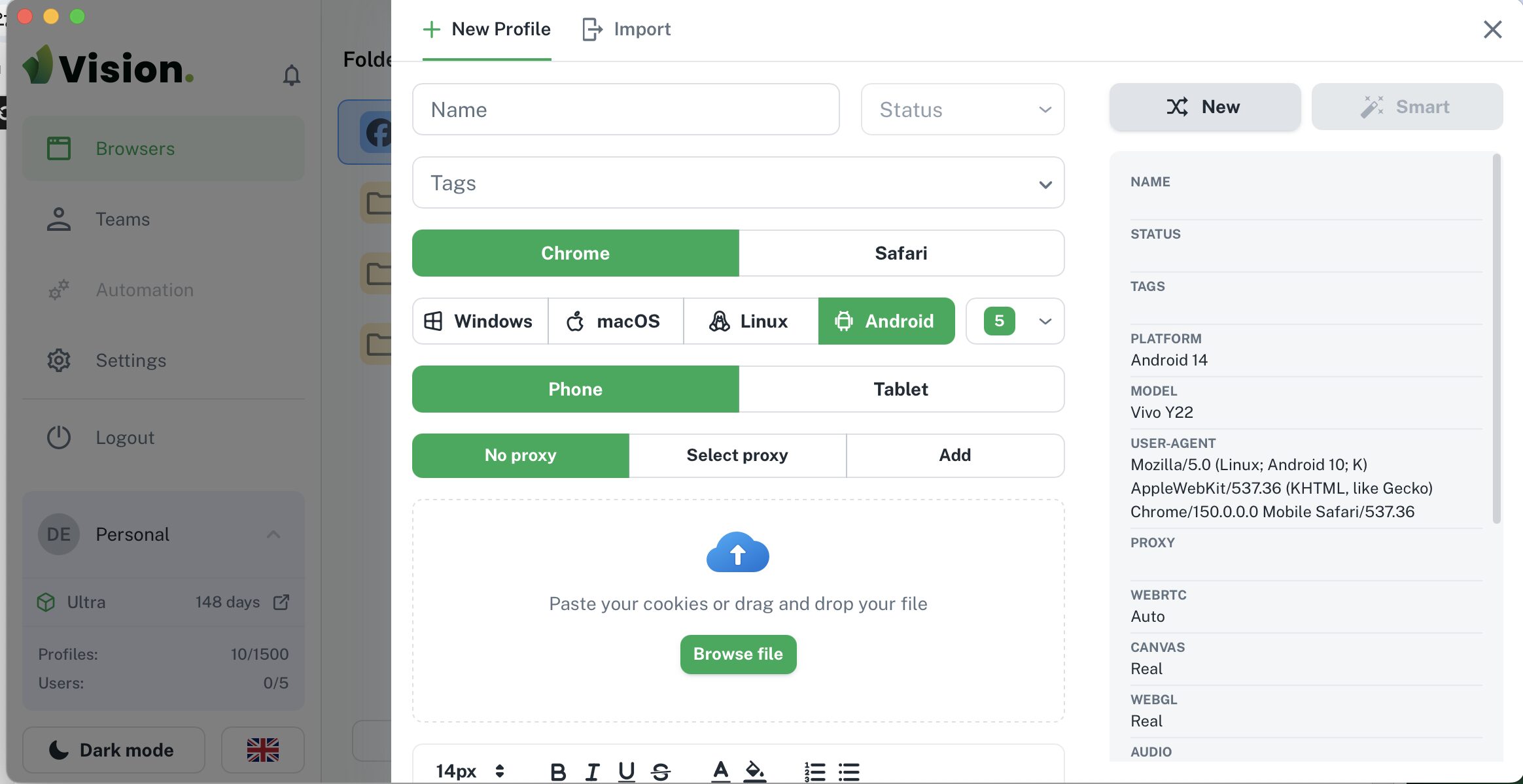
At the same time, you can configure everything manually. When creating a profile, you can specify the browser (Chrome, Safari), operating system (Windows, macOS, Linux, Android), add a proxy, and upload cookies. It’s also convenient that you can immediately see on the right what your “device” will look like.
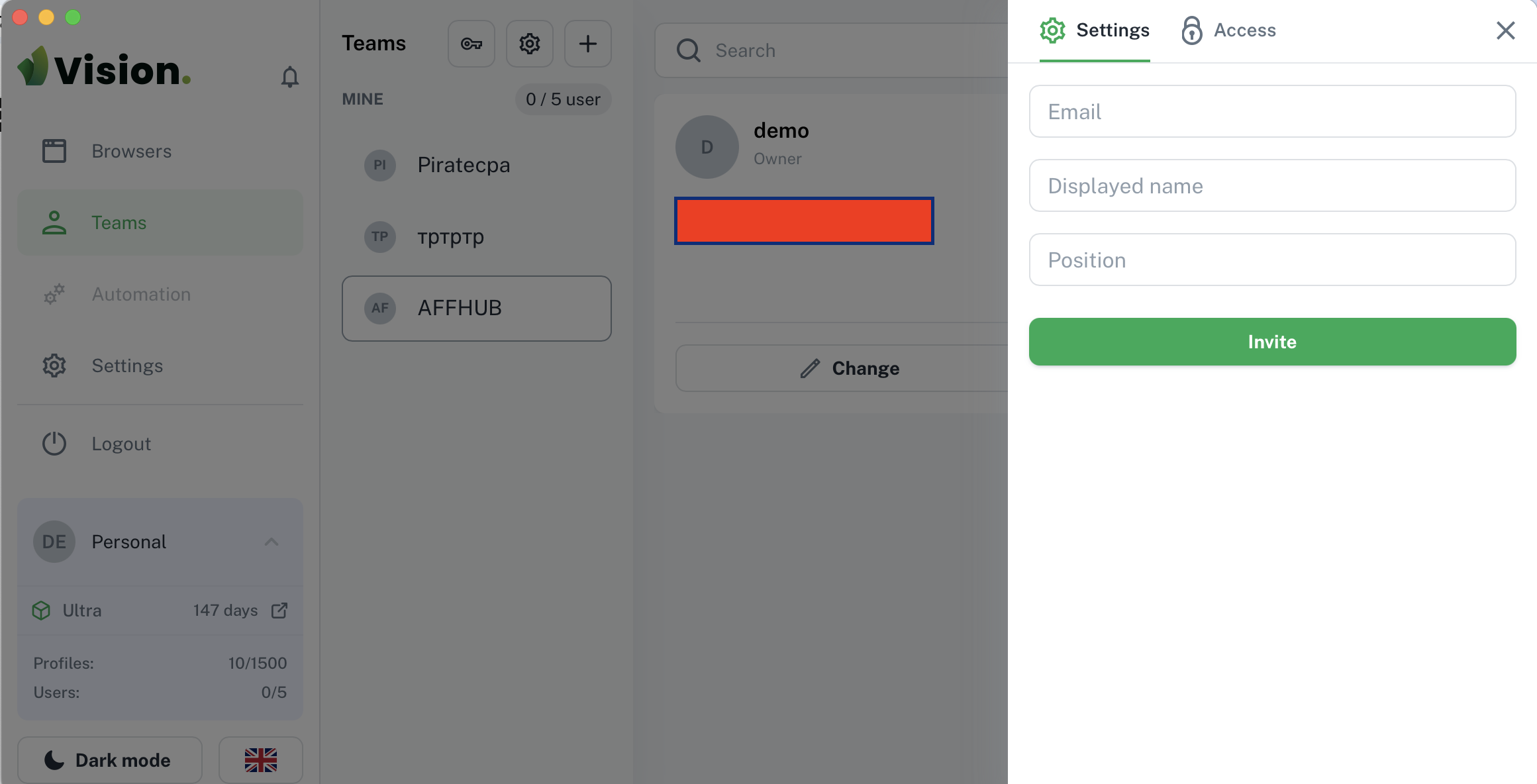
Another handy feature is how easy it is to create a team. To do this, go to the corresponding section in the side menu, click “+,” enter a team name, and upload an image. After that, with just a few clicks, you can add new users to the team and grant them various access rights.
As for access rights, you can flexibly configure them for your team. For example, you can give employees the ability to view the user list, create folders, edit users, or view the profiles they have access to.
Permissions can be assigned either to the entire team at once or to specific groups of employees—such as sales reps, the technical department, or any other divisions. This is especially convenient when working with large teams, where it’s important to delineate access and distribute responsibilities among members.
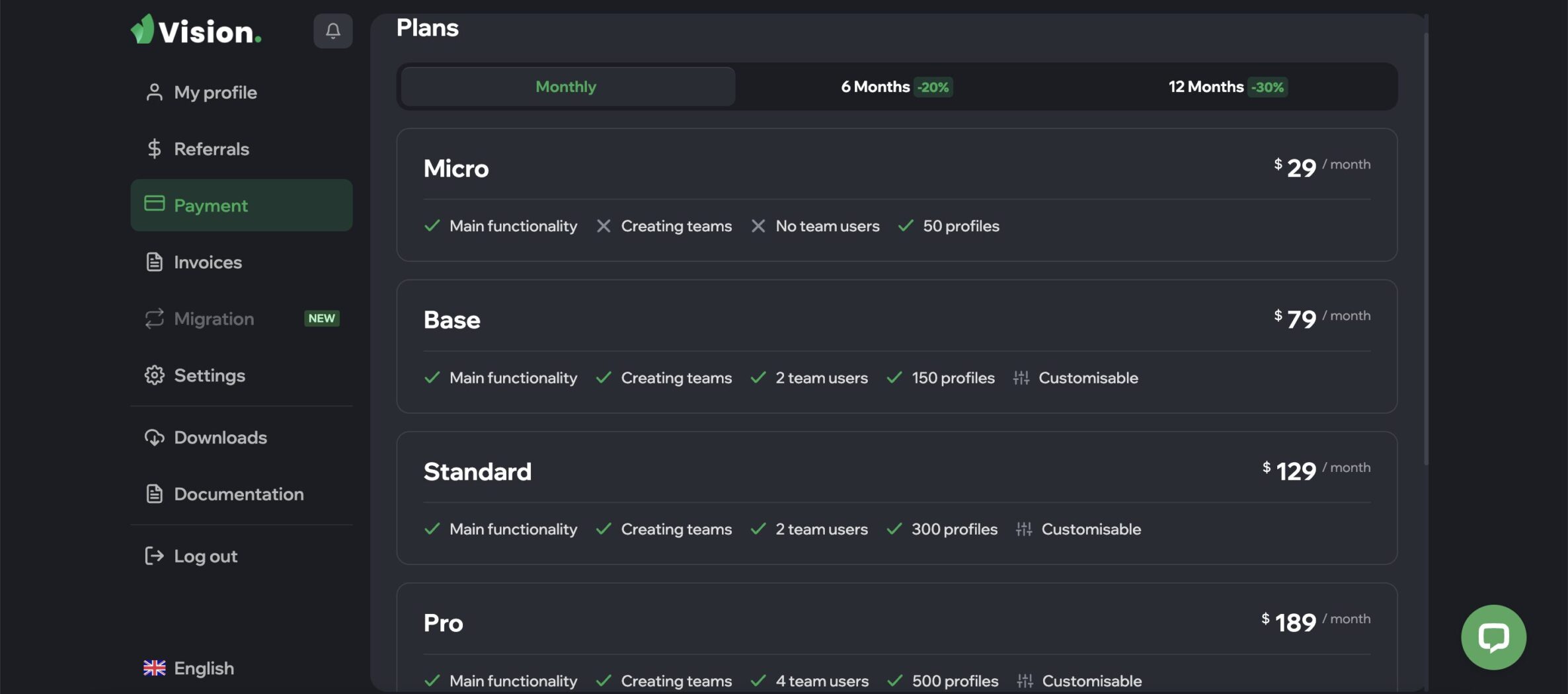
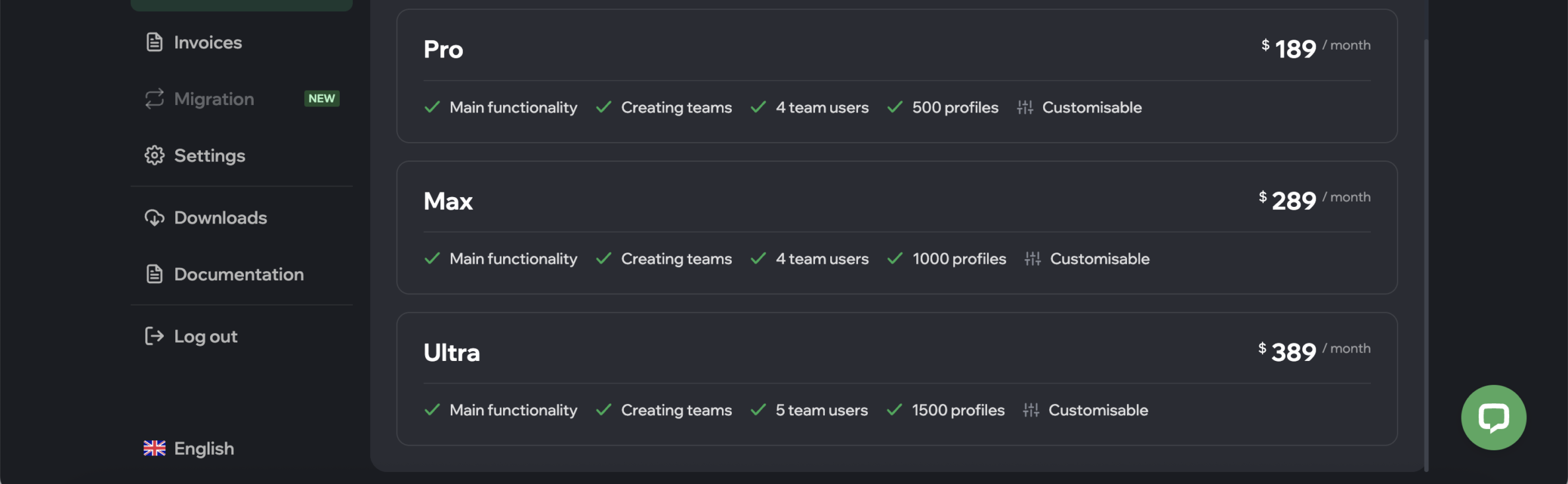
The service’s flexibility in terms of pricing is also impressive. Depending on your needs, you can choose from six different plans. Their prices range from $29 to $389 (if you pay in a lump sum rather than monthly, the cost for each plan will be lower). You can review all plans and terms below:
In Summary
Choosing an anti-detect browser is one of the key steps when getting started. Choosing a reliable product will ensure stable performance and save you a lot of time and stress related to bans.
Vision Browser is a high-quality and extremely intuitive service that addresses all the pain points faced by media buyers. What else do you really need for a successful upload? So follow the link, sign up, and see for yourself. And of course, follow the service on social media:

- 111
- 0
- 0
- By rating
- In order